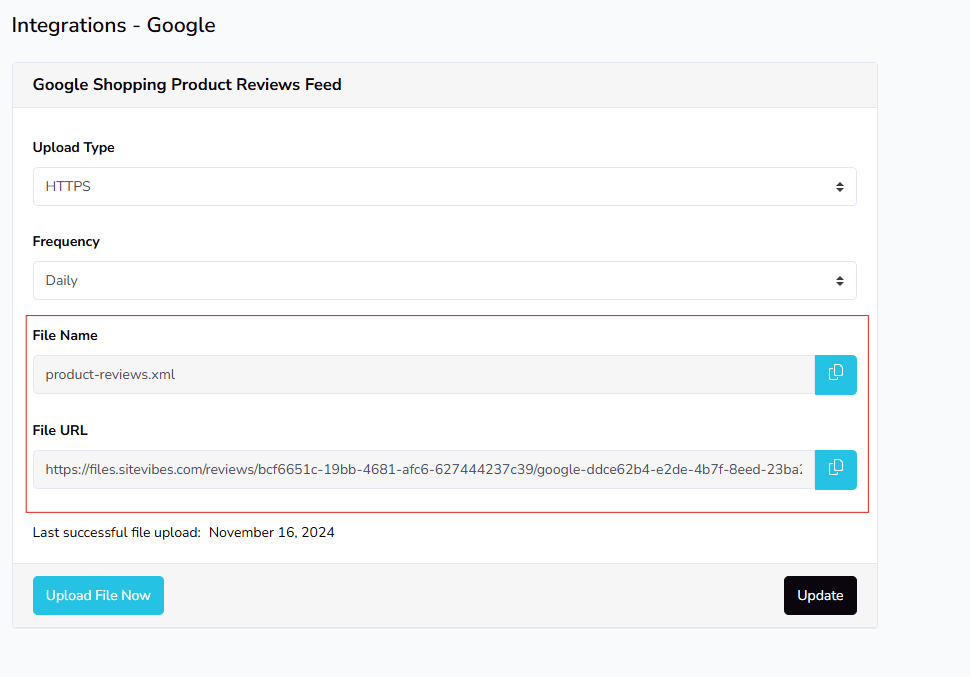
SiteVibes enables submitting product reviews to Google Merchant Center for display to shoppers. To create and submit an XML feed, sign in to SiteVibes, go to Settings → Integrations → Google, select XML upload and update frequency (recommended daily), then create the feed. Copy the generated file name and URL, and add them to your Google Merchant Center following Google's guidelines.
SiteVibes allows you to submit product reviews to Google Merchant Center so that they can show to customers shopping on Google. This article will walk you through creating you XML feed and submitting it to Google Merchant Center.
Adding Feed to Google
To submit your feed to Google, you will follow these steps: https://support.google.com/merchants/answer/14620732.
Creating a Feed in SiteVibes to add to Google
Sign in to your SiteVibes account and navigate to Settings ->Integrations -> Google.
- Select from the Upload Type either SFTP or XML. (we recommend using XML)
- Select the frequency the feed should be updated. (we recommend daily)
- Click create
Copy your File Name and File URL
After you create your feed, you will see a file name and a file URL. Go to your Google merchant center to add both the file and the URL.